
Menu (computer) in New Zealand Sign Language (NZSL)

The sign for “menu (computer)” is used in the New Zealand Deaf community to refer to digital menus found in applications or software. This sign is particularly useful when navigating through various options on a computer or mobile device. It’s a common term in everyday discussions about technology, making it essential for those using NZSL.
Table of Contents
How to Sign “Menu (Computer)” in NZSL
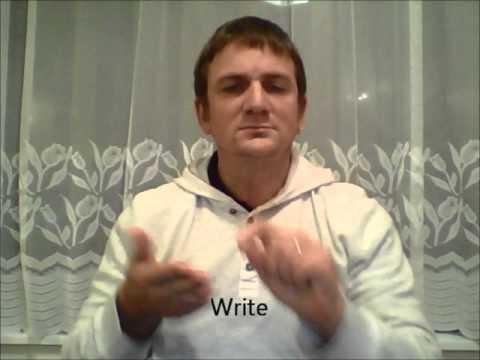
- Start with your dominant hand open, fingers together, and palm facing down.
- Position your hand in front of your chest, around shoulder height.
- Move your hand downward in a slight arc, as if you are pulling down a menu.
- As you move your hand, slightly wiggle your fingers to suggest options being displayed.
- Maintain a neutral facial expression, but you can add a slight nod to indicate understanding or acknowledgment.
Common Mistakes
- Forgetting to wiggle fingers during the movement, which can make the sign unclear.
- Using a flat hand instead of an open hand, which can change the meaning.
- Not following through with the downward movement, making it look incomplete.
NZSL vs ASL
In NZSL, the sign for “menu (computer)” involves a downward movement with an open hand, while in ASL, the sign may differ in handshape and movement style. This illustrates the unique features and influences in each sign language, with NZSL incorporating elements from both BSL and its own distinct signs.
Related Signs
- (All Of) You – A sign used to refer to a group of people.
- (Baby’s) Dummy – Referring to a pacifier or teething device.
- (Be) Careful – A sign indicating caution or awareness.
Frequently Asked Questions
How can I use “menu (computer)” in a sentence?
You can say: “I opened the menu on my computer” by signing “I” + “open” + “menu (computer)”.
Are there regional variations for this sign in New Zealand?
While the sign is generally consistent across New Zealand, some regional variations may exist based on local dialects within the Deaf community.
What are some similar signs?
Signs for “options” or “settings” may be similar, as they also relate to choices in technology.
Any tips for learning this sign?
Practice in front of a mirror to ensure your hand shape and movement are correct. Watching videos of native signers can also be helpful.
Is there a cultural significance to this sign?
Yes, as technology becomes more integrated into daily life, understanding signs related to it helps bridge communication within the Deaf community.
How do I describe a menu to someone who doesn’t know what it is?
You could use gestures to mimic scrolling or selecting items, while also using the sign for “menu (computer)” to give context.
Practice This Sign
Try signing Menu (Computer) with your camera and get AI coaching on your handshape, movement, and location.
Free · No signup required