
Click in Sign Language (ASL)
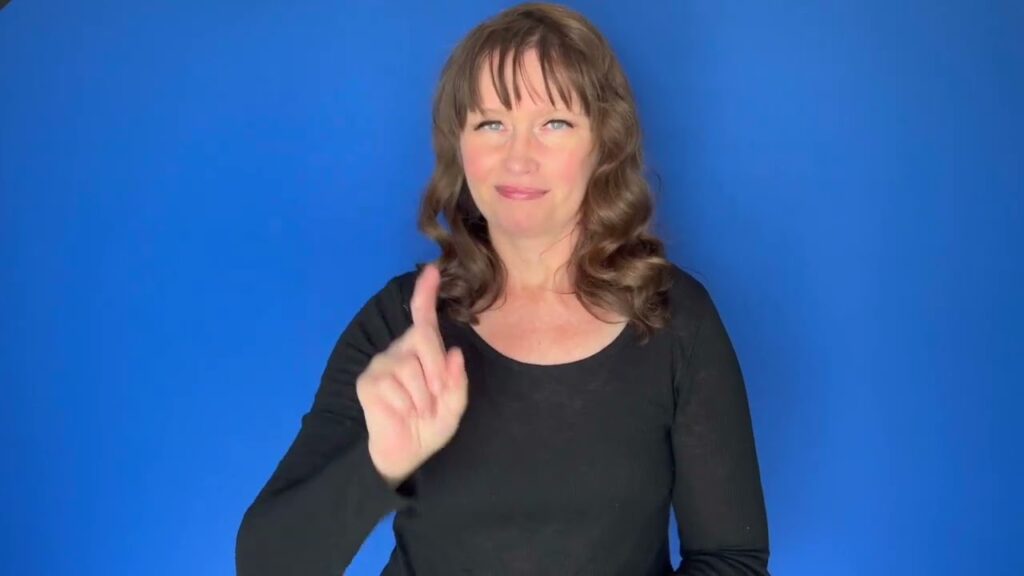
The sign “Click” is used to represent the sound made when two items come together sharply, as in a mouse click, or to express the action of making a clicking noise. It is commonly used in contexts related to technology, communication, or when describing a realization or understanding. Understanding how to properly use “Click” can enhance clarity and engagement during conversations in ASL.
[VIDEO_PLACEHOLDER]
Table of Contents
Forming the sign
- Handshape: Start with your dominant hand in a flat “O” shape, where your fingers are fully extended and your thumb is touching your index finger.
- Location: Position your hand in front of your face, at about chin level. This is to ensure that the sign is visible and understood by your conversation partner.
- Movement: Quickly draw your hand away from your face, opening it into a flat palm. This movement mimics the action of clicking, providing a visual representation of the sound.
- Non-manual signals: Accompany the sign with a facial expression that indicates attention or realization, as this can help convey the context of the click. For instance, raising your eyebrows slightly can emphasize the action.
The sign is straightforward but effective in conveying the concept of a click. It’s important to practice the movement to ensure it is fluid and natural, as this will enhance communication with your Deaf peers.
Showing tense, aspect & repetition
In ASL, conveying tense or aspect can be achieved through facial expressions and body language. For example, if you want to indicate that a click happened repeatedly, you can perform the sign multiple times while maintaining an expressive face to show the ongoing action. Conversely, a single sign with a neutral expression may imply a one-time event. Adjusting the speed and intensity of your movement can also indicate the urgency or frequency of the click.
“Click” in everyday signing
The usage of “Click” is versatile and can appear in various contexts. For instance, you might use it while discussing technology (“I just clicked on the link”) or in a storytelling context to signify a moment of realization (“Then it clicked for me”). Incorporating the sign appropriately within your dialogue can enrich your storytelling or discussions, making them more engaging for your audience.
Common confusion with a similar sign
Some learners may confuse the sign “Click” with “Snap.” While both involve a quick motion, “Snap” generally represents the sound of fingers snapping together and is used in different contexts. Being aware of these subtle differences can enhance your signing accuracy and help avoid misunderstandings in conversation.
FAQ
What contexts do I use “Click” in?
“Click” is used in both technology-related discussions, like clicking a mouse, and in conveying sudden realizations or understanding in conversations.
How can I show that a click happened repeatedly?
You can repeat the sign multiple times while using facial expressions to indicate the frequency or urgency of the clicks.
Can “Click” be used for sounds other than a mouse click?
Yes, “Click” can also represent similar sharp sounds, such as snapping fingers or other quick actions. Context is key!
What is the best way to practice this sign?
Practice in front of a mirror or with a Deaf friend to get feedback on your handshape, movement, and facial expressions.
Practice ASL Signs
Use your camera to practice signs and get real-time AI feedback on your technique.
Free · No signup required